
⭐ A Beginner’s Guide to Understanding Vista Jobs, Contracts & Billing
A clearer way to understand Vista’s Job to billing workflow


If you’ve ever felt overwhelmed trying to understand how jobs, phases, contract items, and billing all connect inside Vista, you’re not alone. Many construction teams know how to enter data into Vista — but not why the system works the way it does. And when the “why” isn’t clear, billing becomes confusing, costs don’t match revenue, and billing applications never seem to lineup with what the owner expects.
This blog about Vista’s structure allows you to see how the pieces fit together. Everything — costs, billing, revenue, WIP, percent complete — flows through a simple chain:
· Job → Phases → Contract → Contract Items → Billing
When this chain is set up correctly, Vista becomes a powerful engine that automates billing, keeps your numbers accurate, and gives owners exactly what they expect on their billing forms.
This guide uses a realistic, easy‑to‑follow example to show how the entire workflow connects — and why it matters.
🧩 The Big Picture: Everything Starts With the Job
Vista’s Job Cost module is the core of the system. When you create a job in JC Job
- Vista can default a contract with the same number
- You can create Contract Item #1
- And links the job to that contract
This ensures every job has something to bill against — even if you later replace the placeholder with a full schedule of values.
🧱 Step 1 — Build the Job Phases (Where Costs Actually Hit)
A job is broken into phases, which represent the work breakdown. These phases are where your actual costs land when payroll, AP, equipment, or materials are posted.
Examples:
- 0100 Mobilization
- 0200 Site Utilities
- 0300 Excavation
- 0400 Concrete Foundations
- 0500 Concrete Slab
- 0600 Steel Erection
These phases come from JC Job Phases and form the backbone of cost tracking.
📑 Step 2 — Build the Contract Items (Schedule of Values)
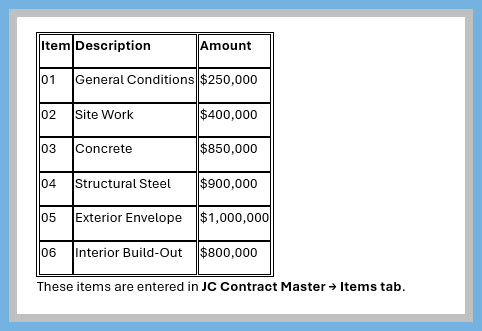
Contract items represent how the customer will be billed. They are the lines that appear on the billing. You can use some of the canned reports such as the JB Application for Payment or the JB AIA Continuation Form, this report was designed to print on AIA's Form G703 Continuation sheet.
Example Schedule of Values
Job 24018 – New Medical Office Building
Contract Value: $4,200,000
🔗 Step 3 — Link Phases to Contract Items
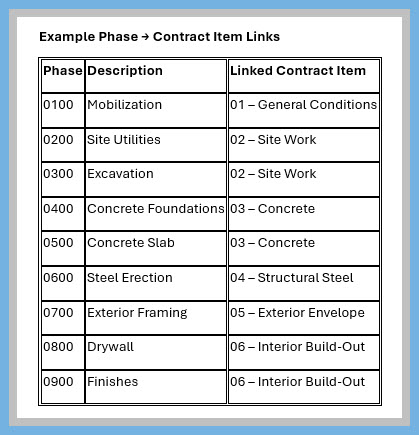
This is where most billing problems originate.
- How to populate the JB Application for Payment or the JB AIA Continuation Form
Example Phase → Contract Item Links
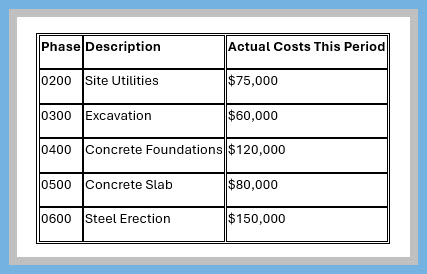
💵 Step 4 — Costs Hit the Job
Let’s say this month the following costs were posted:
📊 Step 5 — Your company decides what to bill
- Construction companies usually bill using percentage‑of‑completion (POC) or progress billing, both of which rely heavily on cost‑to‑date. WIP meetings exist to compare actual costs, estimated total costs, and billings to date to determine whether a job is overbilled or underbilled
- Reports you may find helpful are the PM Contract Analysis Drilldown, JC Contract Profit w/Item Details, or the JC Cost Report
🧾 Step 6 — Billing Output
Continuation Sheet
Application and Certification for Payment Contractor’s signed certification is attached.
Amounts stated to the nearest cent.
Invoice No.: 15 Contract: 24018 – New Medical Office Building Application No.: 1 Application Date: 04/30/26 Architect’s Project No.: (blank)

⭐ Conclusion: Why This Workflow Matters
Once you understand how Vista ties job phases, contract items, and billing together, the entire system suddenly makes sense. Costs land where they should.
This structure creates accurate billing, clean WIP reporting, and reliable job profitability. When phases are linked correctly to contract items, Vista becomes transparent for your projects.
As always, if you need assistance with any Vista processes, please visit our website ConstrucTech Consulting and Book a Call with one of our consultants.
If you’ve ever felt overwhelmed trying to understand how jobs, phases, contract items, and billing all connect inside Vista, you’re not alone. Many construction teams know how to enter data into Vista — but not why the system works the way it does. And when the “why” isn’t clear, billing becomes confusing, costs don’t match revenue, and billing applications never seem to lineup with what the owner expects.
This blog about Vista’s structure allows you to see how the pieces fit together. Everything — costs, billing, revenue, WIP, percent complete — flows through a simple chain:
· Job → Phases → Contract → Contract Items → Billing
When this chain is set up correctly, Vista becomes a powerful engine that automates billing, keeps your numbers accurate, and gives owners exactly what they expect on their billing forms.
This guide uses a realistic, easy‑to‑follow example to show how the entire workflow connects — and why it matters.
🧩 The Big Picture: Everything Starts With the Job
Vista’s Job Cost module is the core of the system. When you create a job in JC Job
- Vista can default a contract with the same number
- You can create Contract Item #1
- And links the job to that contract
This ensures every job has something to bill against — even if you later replace the placeholder with a full schedule of values.
🧱 Step 1 — Build the Job Phases (Where Costs Actually Hit)
A job is broken into phases, which represent the work breakdown. These phases are where your actual costs land when payroll, AP, equipment, or materials are posted.
Examples:
- 0100 Mobilization
- 0200 Site Utilities
- 0300 Excavation
- 0400 Concrete Foundations
- 0500 Concrete Slab
- 0600 Steel Erection
These phases come from JC Job Phases and form the backbone of cost tracking.
📑 Step 2 — Build the Contract Items (Schedule of Values)
Contract items represent how the customer will be billed. They are the lines that appear on the billing. You can use some of the canned reports such as the JB Application for Payment or the JB AIA Continuation Form, this report was designed to print on AIA's Form G703 Continuation sheet.
Example Schedule of Values
Job 24018 – New Medical Office Building
Contract Value: $4,200,000
🔗 Step 3 — Link Phases to Contract Items
This is where most billing problems originate.
- How to populate the JB Application for Payment or the JB AIA Continuation Form
Example Phase → Contract Item Links
💵 Step 4 — Costs Hit the Job
Let’s say this month the following costs were posted:
📊 Step 5 — Your company decides what to bill
- Construction companies usually bill using percentage‑of‑completion (POC) or progress billing, both of which rely heavily on cost‑to‑date. WIP meetings exist to compare actual costs, estimated total costs, and billings to date to determine whether a job is overbilled or underbilled
- Reports you may find helpful are the PM Contract Analysis Drilldown, JC Contract Profit w/Item Details, or the JC Cost Report
🧾 Step 6 — Billing Output
Continuation Sheet
Application and Certification for Payment Contractor’s signed certification is attached.
Amounts stated to the nearest cent.
Invoice No.: 15 Contract: 24018 – New Medical Office Building Application No.: 1 Application Date: 04/30/26 Architect’s Project No.: (blank)
⭐ Conclusion: Why This Workflow Matters
Once you understand how Vista ties job phases, contract items, and billing together, the entire system suddenly makes sense. Costs land where they should.
This structure creates accurate billing, clean WIP reporting, and reliable job profitability. When phases are linked correctly to contract items, Vista becomes transparent for your projects.
As always, if you need assistance with any Vista processes, please visit our website ConstrucTech Consulting and Book a Call with one of our consultants.
If you’ve ever felt overwhelmed trying to understand how jobs, phases, contract items, and billing all connect inside Vista, you’re not alone. Many construction teams know how to enter data into Vista — but not why the system works the way it does. And when the “why” isn’t clear, billing becomes confusing, costs don’t match revenue, and billing applications never seem to lineup with what the owner expects.
This blog about Vista’s structure allows you to see how the pieces fit together. Everything — costs, billing, revenue, WIP, percent complete — flows through a simple chain:
· Job → Phases → Contract → Contract Items → Billing
When this chain is set up correctly, Vista becomes a powerful engine that automates billing, keeps your numbers accurate, and gives owners exactly what they expect on their billing forms.
This guide uses a realistic, easy‑to‑follow example to show how the entire workflow connects — and why it matters.
🧩 The Big Picture: Everything Starts With the Job
Vista’s Job Cost module is the core of the system. When you create a job in JC Job
- Vista can default a contract with the same number
- You can create Contract Item #1
- And links the job to that contract
This ensures every job has something to bill against — even if you later replace the placeholder with a full schedule of values.
🧱 Step 1 — Build the Job Phases (Where Costs Actually Hit)
A job is broken into phases, which represent the work breakdown. These phases are where your actual costs land when payroll, AP, equipment, or materials are posted.
Examples:
- 0100 Mobilization
- 0200 Site Utilities
- 0300 Excavation
- 0400 Concrete Foundations
- 0500 Concrete Slab
- 0600 Steel Erection
These phases come from JC Job Phases and form the backbone of cost tracking.
📑 Step 2 — Build the Contract Items (Schedule of Values)
Contract items represent how the customer will be billed. They are the lines that appear on the billing. You can use some of the canned reports such as the JB Application for Payment or the JB AIA Continuation Form, this report was designed to print on AIA's Form G703 Continuation sheet.
Example Schedule of Values
Job 24018 – New Medical Office Building
Contract Value: $4,200,000
🔗 Step 3 — Link Phases to Contract Items
This is where most billing problems originate.
- How to populate the JB Application for Payment or the JB AIA Continuation Form
Example Phase → Contract Item Links
💵 Step 4 — Costs Hit the Job
Let’s say this month the following costs were posted:
📊 Step 5 — Your company decides what to bill
- Construction companies usually bill using percentage‑of‑completion (POC) or progress billing, both of which rely heavily on cost‑to‑date. WIP meetings exist to compare actual costs, estimated total costs, and billings to date to determine whether a job is overbilled or underbilled
- Reports you may find helpful are the PM Contract Analysis Drilldown, JC Contract Profit w/Item Details, or the JC Cost Report
🧾 Step 6 — Billing Output
Continuation Sheet
Application and Certification for Payment Contractor’s signed certification is attached.
Amounts stated to the nearest cent.
Invoice No.: 15 Contract: 24018 – New Medical Office Building Application No.: 1 Application Date: 04/30/26 Architect’s Project No.: (blank)
⭐ Conclusion: Why This Workflow Matters
Once you understand how Vista ties job phases, contract items, and billing together, the entire system suddenly makes sense. Costs land where they should.
This structure creates accurate billing, clean WIP reporting, and reliable job profitability. When phases are linked correctly to contract items, Vista becomes transparent for your projects.
As always, if you need assistance with any Vista processes, please visit our website ConstrucTech Consulting and Book a Call with one of our consultants.


Get Started
Take your construction company to the next level. Schedule your initial free consultation and analysis.