
Tip Tuesday
Attachment Types in Document Management
Attachment Types in Document Management

Attachment Types
in Vista Document Management
Attachment Types in Trimble Vista Document Management provide a way to organize documents, control access, and manage document retention. When storing documents in Vista, assigning an appropriate attachment type can make documents easier to manage and maintain.
What Are Attachment Types?
Vista includes several standard attachment types that can be used to group related documents. Attachment types provide three primary functions:
1. Organize and Group Documents
Attachment types provide a high-level method for grouping and organizing related documents.
For example, attachment types can be used for:
- AP invoices
- Payroll timecards
- RFIs
- RFQs
- Transmittals
- Project documents
- Employee documents
-
Using attachment types consistently makes it easier to identify and manage documents through out the system.
2. Establish Document Security
Attachment types can be used to establish security for documents.
Attachment security allows you to control access to documents based on their assigned attachment type. This is especially useful for documents containing sensitive information.
For example, you may want to restrict access to attachment types such as:
- HR Drug Test Results
- HR Employment Applications
- Employee Personnel Documents
- Other confidential HR-related documents
-
This allows your organization to control who can view sensitive documents without having to manage security individually for every document.
3. Manage Document Retention
Attachment types can also be used to establish retention periods for documents.
For example, if your organization stores a large number of AP invoices, you can configure the appropriate attachment type with a retention period. Vista can then identify documents that have reached their expiration date so they can be purged according to your organization's document retention policy.
Custom Attachment Types
In addition to the standard attachment types provided with Vista, you can create and maintain custom attachment types to meet your organization's specific needs.
For example, a company may create attachment types for:
- Subcontractor Insurance Certificates
- Safety Documents
- Equipment Inspections
- Lien Waivers
- W-9s
- Project Closeout Documents
-
When creating custom attachment types, consider how the documents will be organized, who should have access to them, and how long they need to be retained.
Attachment Type Status
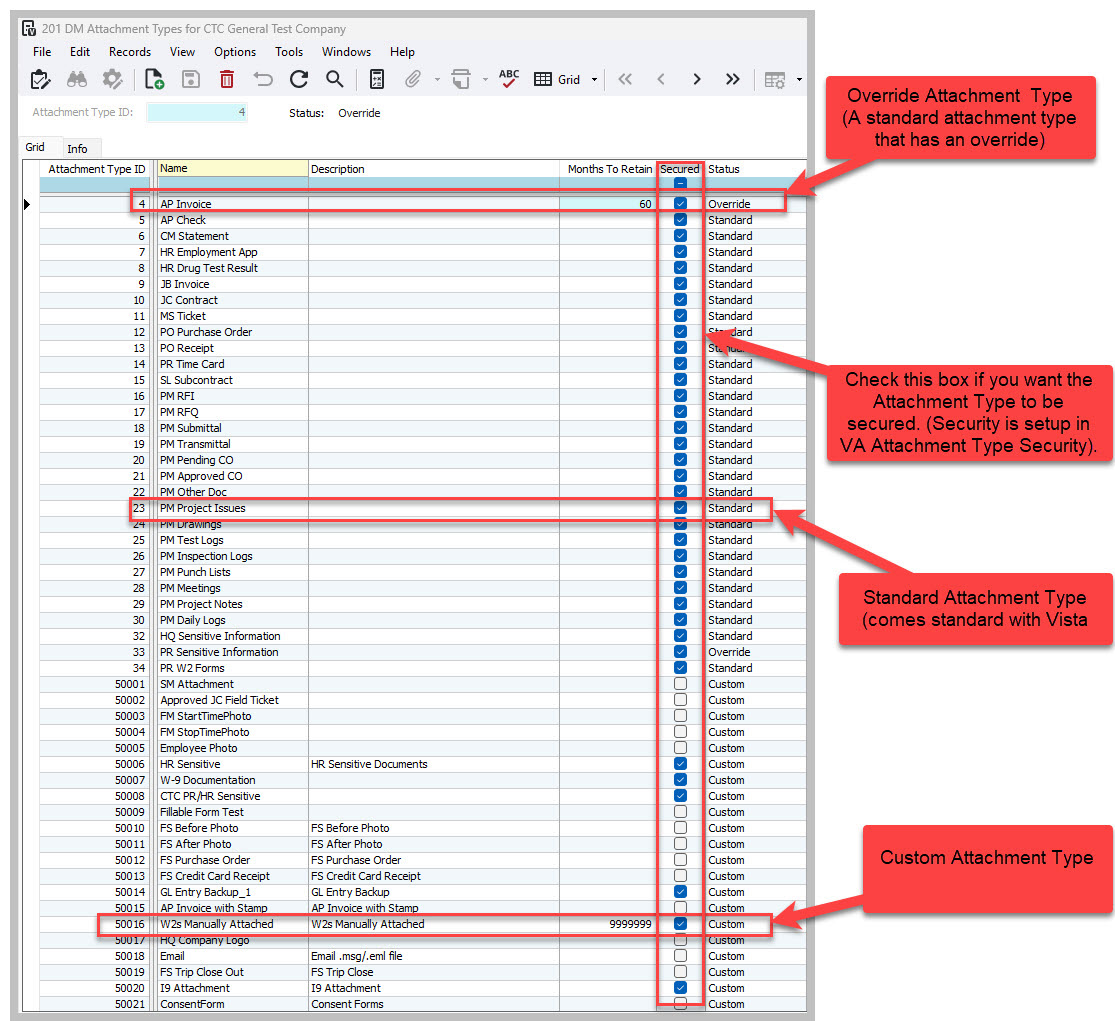
Vista automatically assigns a Status to each attachment type. The status cannot be manually changed.
There are three possible statuses:
Standard – Assigned to attachment types that are provided by Vista.
Custom – Assigned to attachment types that have been created manually by your organization.
Override – Assigned to a standard Vista attachment type that has been modified.
For example, suppose Vista provides a standard attachment type with a specific retention period. If you change the retention period and save the record, Vista automatically changes the status from Standard to Override.
This allows Vista to distinguish between its original standard settings and settings that have been customized by your organization.
Deleting Attachment Types
Attachment types can only be deleted when their status is Custom or Override, and the attachment type is not currently associated with any documents.
There is an important distinction when deleting an Override attachment type.
If you delete an Override attachment type, Vista does not permanently remove the standard attachment type. Instead, the attachment type reverts to the original Vista standard settings, and its status changes back to Standard.
Key Takeaway
Attachment Types are an important part of Vista Document Management because they provide more than simple document organization. They can be used to group documents, control security, and manage document retention.
Before creating custom attachment types, consider your organization's document management requirements and establish a consistent naming and classification strategy. This will make your Document Management system easier to maintain as the number of stored documents grows.
If you need additional information on setting up Attachment Types in Vista Document Management, please visit our website by clicking here. You can click on Book A Call to schedule a call with one of our consultants.
Attachment Types
in Vista Document Management
Attachment Types in Trimble Vista Document Management provide a way to organize documents, control access, and manage document retention. When storing documents in Vista, assigning an appropriate attachment type can make documents easier to manage and maintain.
What Are Attachment Types?
Vista includes several standard attachment types that can be used to group related documents. Attachment types provide three primary functions:
1. Organize and Group Documents
Attachment types provide a high-level method for grouping and organizing related documents.
For example, attachment types can be used for:
- AP invoices
- Payroll timecards
- RFIs
- RFQs
- Transmittals
- Project documents
- Employee documents
-
Using attachment types consistently makes it easier to identify and manage documents through out the system.
2. Establish Document Security
Attachment types can be used to establish security for documents.
Attachment security allows you to control access to documents based on their assigned attachment type. This is especially useful for documents containing sensitive information.
For example, you may want to restrict access to attachment types such as:
- HR Drug Test Results
- HR Employment Applications
- Employee Personnel Documents
- Other confidential HR-related documents
-
This allows your organization to control who can view sensitive documents without having to manage security individually for every document.
3. Manage Document Retention
Attachment types can also be used to establish retention periods for documents.
For example, if your organization stores a large number of AP invoices, you can configure the appropriate attachment type with a retention period. Vista can then identify documents that have reached their expiration date so they can be purged according to your organization's document retention policy.
Custom Attachment Types
In addition to the standard attachment types provided with Vista, you can create and maintain custom attachment types to meet your organization's specific needs.
For example, a company may create attachment types for:
- Subcontractor Insurance Certificates
- Safety Documents
- Equipment Inspections
- Lien Waivers
- W-9s
- Project Closeout Documents
-
When creating custom attachment types, consider how the documents will be organized, who should have access to them, and how long they need to be retained.
Attachment Type Status
Vista automatically assigns a Status to each attachment type. The status cannot be manually changed.
There are three possible statuses:
Standard – Assigned to attachment types that are provided by Vista.
Custom – Assigned to attachment types that have been created manually by your organization.
Override – Assigned to a standard Vista attachment type that has been modified.
For example, suppose Vista provides a standard attachment type with a specific retention period. If you change the retention period and save the record, Vista automatically changes the status from Standard to Override.
This allows Vista to distinguish between its original standard settings and settings that have been customized by your organization.
Deleting Attachment Types
Attachment types can only be deleted when their status is Custom or Override, and the attachment type is not currently associated with any documents.
There is an important distinction when deleting an Override attachment type.
If you delete an Override attachment type, Vista does not permanently remove the standard attachment type. Instead, the attachment type reverts to the original Vista standard settings, and its status changes back to Standard.
Key Takeaway
Attachment Types are an important part of Vista Document Management because they provide more than simple document organization. They can be used to group documents, control security, and manage document retention.
Before creating custom attachment types, consider your organization's document management requirements and establish a consistent naming and classification strategy. This will make your Document Management system easier to maintain as the number of stored documents grows.
If you need additional information on setting up Attachment Types in Vista Document Management, please visit our website by clicking here. You can click on Book A Call to schedule a call with one of our consultants.
Attachment Types
in Vista Document Management
Attachment Types in Trimble Vista Document Management provide a way to organize documents, control access, and manage document retention. When storing documents in Vista, assigning an appropriate attachment type can make documents easier to manage and maintain.
What Are Attachment Types?
Vista includes several standard attachment types that can be used to group related documents. Attachment types provide three primary functions:
1. Organize and Group Documents
Attachment types provide a high-level method for grouping and organizing related documents.
For example, attachment types can be used for:
- AP invoices
- Payroll timecards
- RFIs
- RFQs
- Transmittals
- Project documents
- Employee documents
-
Using attachment types consistently makes it easier to identify and manage documents through out the system.
2. Establish Document Security
Attachment types can be used to establish security for documents.
Attachment security allows you to control access to documents based on their assigned attachment type. This is especially useful for documents containing sensitive information.
For example, you may want to restrict access to attachment types such as:
- HR Drug Test Results
- HR Employment Applications
- Employee Personnel Documents
- Other confidential HR-related documents
-
This allows your organization to control who can view sensitive documents without having to manage security individually for every document.
3. Manage Document Retention
Attachment types can also be used to establish retention periods for documents.
For example, if your organization stores a large number of AP invoices, you can configure the appropriate attachment type with a retention period. Vista can then identify documents that have reached their expiration date so they can be purged according to your organization's document retention policy.
Custom Attachment Types
In addition to the standard attachment types provided with Vista, you can create and maintain custom attachment types to meet your organization's specific needs.
For example, a company may create attachment types for:
- Subcontractor Insurance Certificates
- Safety Documents
- Equipment Inspections
- Lien Waivers
- W-9s
- Project Closeout Documents
-
When creating custom attachment types, consider how the documents will be organized, who should have access to them, and how long they need to be retained.
Attachment Type Status
Vista automatically assigns a Status to each attachment type. The status cannot be manually changed.
There are three possible statuses:
Standard – Assigned to attachment types that are provided by Vista.
Custom – Assigned to attachment types that have been created manually by your organization.
Override – Assigned to a standard Vista attachment type that has been modified.
For example, suppose Vista provides a standard attachment type with a specific retention period. If you change the retention period and save the record, Vista automatically changes the status from Standard to Override.
This allows Vista to distinguish between its original standard settings and settings that have been customized by your organization.
Deleting Attachment Types
Attachment types can only be deleted when their status is Custom or Override, and the attachment type is not currently associated with any documents.
There is an important distinction when deleting an Override attachment type.
If you delete an Override attachment type, Vista does not permanently remove the standard attachment type. Instead, the attachment type reverts to the original Vista standard settings, and its status changes back to Standard.
Key Takeaway
Attachment Types are an important part of Vista Document Management because they provide more than simple document organization. They can be used to group documents, control security, and manage document retention.
Before creating custom attachment types, consider your organization's document management requirements and establish a consistent naming and classification strategy. This will make your Document Management system easier to maintain as the number of stored documents grows.
If you need additional information on setting up Attachment Types in Vista Document Management, please visit our website by clicking here. You can click on Book A Call to schedule a call with one of our consultants.


Get Started
Take your construction company to the next level. Schedule your initial free consultation and analysis.