
Back to Basics. Vista's grid tab.
This blog post covers the essential features of the Vista Grid View, a powerful tool within the Viewpoint ERP suite designed to help construction professionals manage large datasets with efficiency.


Back to Basics: Mastering Vista’s Grid View
In the fast-paced world of construction management, data is only as good as your ability to see and use it. For users of Viewpoint Vista, the Grid View is the unsung hero of daily operations. While it might look like a simple spreadsheet at first glance, the Grid View is a highly customizable interface that allows you to slice, dice, and organize project information exactly how you need it.
Whether you are tracking job costs, managing payroll, or reviewing equipment maintenance, mastering these "basics" will significantly speed up your workflow.
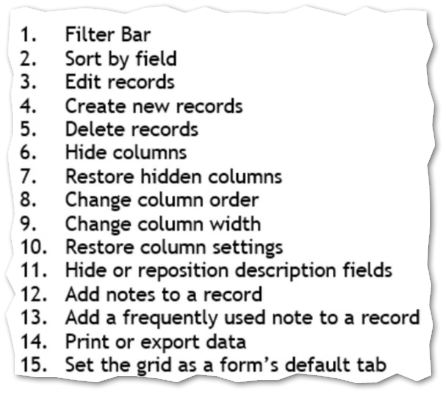
Click here to see these 15 tips and tricks for Vista's Grid in action
Why It Matters
By taking five minutes to set up your Grid Views to match your specific role, you reduce the "noise" in Vista and focus on the data that drives project profitability. It’s a simple change that makes a massive difference in your daily productivity.
Ready to Optimize Your Workflow?
If you want to unlock the full potential of your data and streamline your operations, we are here to help. Visit our website at www.constructech.io and click the Book-A-Call link to schedule a consultation with our experts today.
Back to Basics: Mastering Vista’s Grid View
In the fast-paced world of construction management, data is only as good as your ability to see and use it. For users of Viewpoint Vista, the Grid View is the unsung hero of daily operations. While it might look like a simple spreadsheet at first glance, the Grid View is a highly customizable interface that allows you to slice, dice, and organize project information exactly how you need it.
Whether you are tracking job costs, managing payroll, or reviewing equipment maintenance, mastering these "basics" will significantly speed up your workflow.
Click here to see these 15 tips and tricks for Vista's Grid in action
Why It Matters
By taking five minutes to set up your Grid Views to match your specific role, you reduce the "noise" in Vista and focus on the data that drives project profitability. It’s a simple change that makes a massive difference in your daily productivity.
Ready to Optimize Your Workflow?
If you want to unlock the full potential of your data and streamline your operations, we are here to help. Visit our website at www.constructech.io and click the Book-A-Call link to schedule a consultation with our experts today.
Back to Basics: Mastering Vista’s Grid View
In the fast-paced world of construction management, data is only as good as your ability to see and use it. For users of Viewpoint Vista, the Grid View is the unsung hero of daily operations. While it might look like a simple spreadsheet at first glance, the Grid View is a highly customizable interface that allows you to slice, dice, and organize project information exactly how you need it.
Whether you are tracking job costs, managing payroll, or reviewing equipment maintenance, mastering these "basics" will significantly speed up your workflow.
Click here to see these 15 tips and tricks for Vista's Grid in action
Why It Matters
By taking five minutes to set up your Grid Views to match your specific role, you reduce the "noise" in Vista and focus on the data that drives project profitability. It’s a simple change that makes a massive difference in your daily productivity.
Ready to Optimize Your Workflow?
If you want to unlock the full potential of your data and streamline your operations, we are here to help. Visit our website at www.constructech.io and click the Book-A-Call link to schedule a consultation with our experts today.


Get Started
Take your construction company to the next level. Schedule your initial free consultation and analysis.