
Tip Tuesday
Clean Up Your Vista: Retiring Custom "Business Email" Fields
Keeping professional and personal communications separate just got a whole lot easier.

If you’ve been using a custom User-Defined Field (UD) to track employee business emails or personal emails, it’s time for some spring cleaning! With the native Work Email field now available in the PR and HR modules, you can finally retire those pesky workarounds.

While custom fields got the job done, they didn't "talk" to the rest of the system. Transitioning to the native Work Email field offers several advantages:
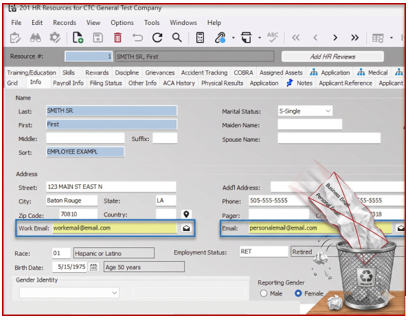
- Goodbye, Double Entry: Unlike custom fields, the native Work Email automatically syncs between the PR Employee (Info tab) and the HR Resources form.
- Trimble ID Integration: The system is specifically programmed to look at this new native field for Trimble ID registration—something your custom fields can't do.
- A Cleaner Interface: Moving data to the Info tab allows you to delete those extra custom fields, making your forms easier to navigate for everyone.
The Strategy
The best practice is to move your professional addresses into this new field and reserve the original "Email" field for personal items like paystubs and tax forms.
Once your data is migrated, you can officially delete those old custom fields and enjoy a more streamlined, "out-of-the-box" Vista experience!
The Migration Plan
If you’re currently using a custom "Business Email" field, the transition is simple:
- Run a quick script to move your data from your UD field to the new WorkEmail column in the Vista tables.
- Verify the sync is working between PR and HR.
- Delete the custom field. It’s rare that a software update lets us remove complexity, so let’s take advantage of it. Reserve the original Email field for personal notifications (paystubs and tax forms) and let the new Work Email field handle the rest!
And if things get confusing…ConstructechConsulting is here to help.
If you’ve been using a custom User-Defined Field (UD) to track employee business emails or personal emails, it’s time for some spring cleaning! With the native Work Email field now available in the PR and HR modules, you can finally retire those pesky workarounds.
While custom fields got the job done, they didn't "talk" to the rest of the system. Transitioning to the native Work Email field offers several advantages:
- Goodbye, Double Entry: Unlike custom fields, the native Work Email automatically syncs between the PR Employee (Info tab) and the HR Resources form.
- Trimble ID Integration: The system is specifically programmed to look at this new native field for Trimble ID registration—something your custom fields can't do.
- A Cleaner Interface: Moving data to the Info tab allows you to delete those extra custom fields, making your forms easier to navigate for everyone.
The Strategy
The best practice is to move your professional addresses into this new field and reserve the original "Email" field for personal items like paystubs and tax forms.
Once your data is migrated, you can officially delete those old custom fields and enjoy a more streamlined, "out-of-the-box" Vista experience!
The Migration Plan
If you’re currently using a custom "Business Email" field, the transition is simple:
- Run a quick script to move your data from your UD field to the new WorkEmail column in the Vista tables.
- Verify the sync is working between PR and HR.
- Delete the custom field. It’s rare that a software update lets us remove complexity, so let’s take advantage of it. Reserve the original Email field for personal notifications (paystubs and tax forms) and let the new Work Email field handle the rest!
And if things get confusing…ConstructechConsulting is here to help.
If you’ve been using a custom User-Defined Field (UD) to track employee business emails or personal emails, it’s time for some spring cleaning! With the native Work Email field now available in the PR and HR modules, you can finally retire those pesky workarounds.
While custom fields got the job done, they didn't "talk" to the rest of the system. Transitioning to the native Work Email field offers several advantages:
- Goodbye, Double Entry: Unlike custom fields, the native Work Email automatically syncs between the PR Employee (Info tab) and the HR Resources form.
- Trimble ID Integration: The system is specifically programmed to look at this new native field for Trimble ID registration—something your custom fields can't do.
- A Cleaner Interface: Moving data to the Info tab allows you to delete those extra custom fields, making your forms easier to navigate for everyone.
The Strategy
The best practice is to move your professional addresses into this new field and reserve the original "Email" field for personal items like paystubs and tax forms.
Once your data is migrated, you can officially delete those old custom fields and enjoy a more streamlined, "out-of-the-box" Vista experience!
The Migration Plan
If you’re currently using a custom "Business Email" field, the transition is simple:
- Run a quick script to move your data from your UD field to the new WorkEmail column in the Vista tables.
- Verify the sync is working between PR and HR.
- Delete the custom field. It’s rare that a software update lets us remove complexity, so let’s take advantage of it. Reserve the original Email field for personal notifications (paystubs and tax forms) and let the new Work Email field handle the rest!
And if things get confusing…ConstructechConsulting is here to help.


Get Started
Take your construction company to the next level. Schedule your initial free consultation and analysis.