
Tip Tuesday
Did You Know? You Already Have 4 Ready-to-Use Work Centers in Viewpoint Vista!
Unlock the Hidden Power of Viewpoint Vista: Ready-to-Use Work Centers!


Many Viewpoint Vista users don’t realize they already have access to powerful, built-in Work Centers that can dramatically simplify their daily navigation. Instead of digging through menus and subfolders every time you need a report or record, Work Centers pull your core tasks into a single, organized hub.
The best part? Vista comes out of the box with 4 standard Work Centers that take just seconds to enable:
- Dashboard
- Project Management
- Service Management
- Accounting
How to Add a Standard Work Center in Seconds
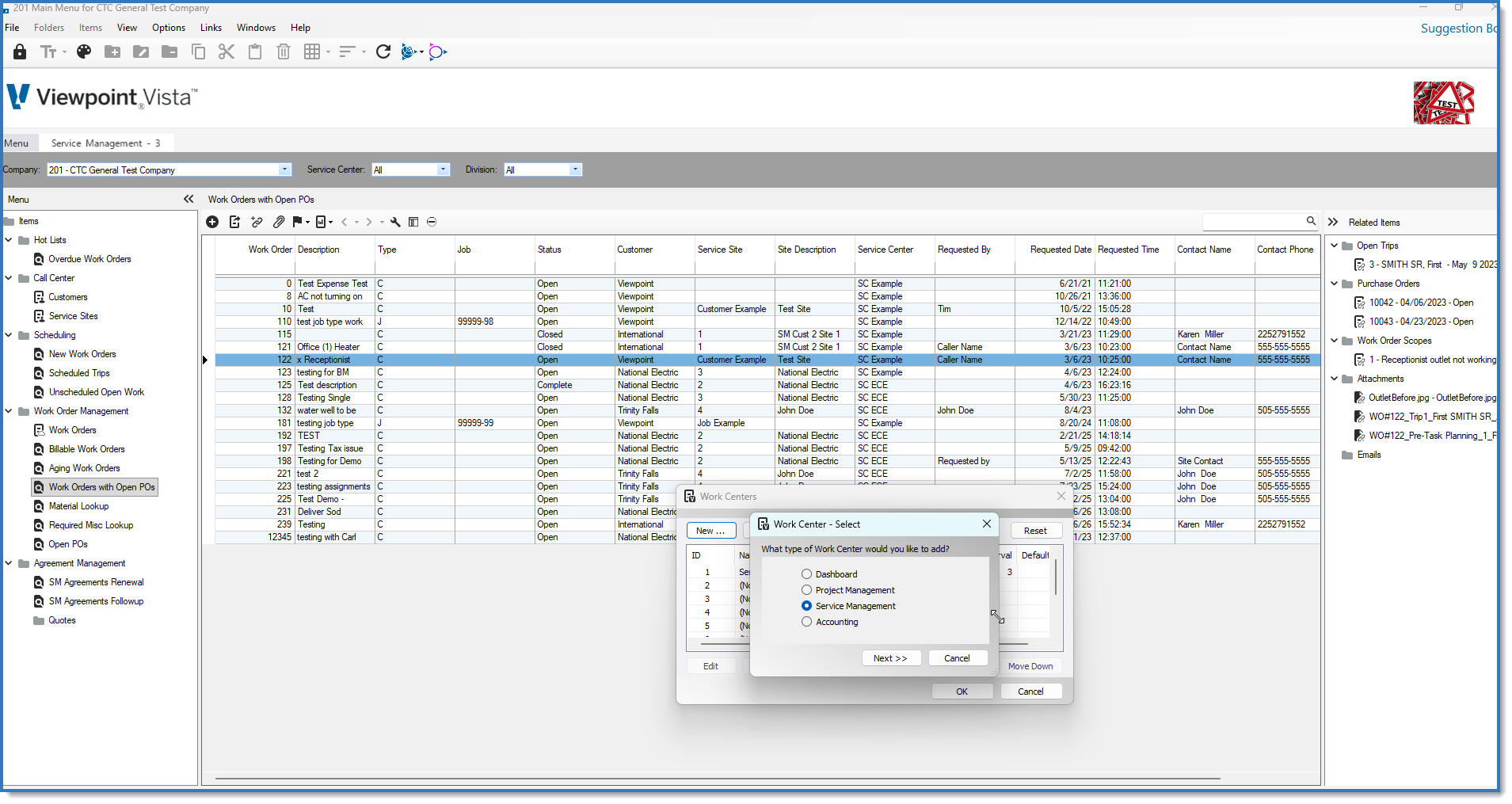
Getting started doesn't require complex setup. Any user can enable these standard views in a few quick clicks:
- On the Main Screen, click Options in the top menu bar.
- Select Work Centers... from the dropdown menu.
- In the Work Centers popup, click New...
- Choose the type of Work Center you want to add (Dashboard, Project Management, Service Management, or Accounting) and click Next to complete the prompt.
That’s it! Your new Work Center tab will populate immediately with standard reports, hot lists, and inquiries for that operational area.
Don't want every user seeing every Work Center? System administrators can easily control visibility across roles and departments using VA Work Center Security to grant or restrict access to specific hubs.
Want to Take Your Work Centers a Step Further?
While the standard 4-Work Centers are a great starting point, the real magic happens when you start customizing them and adding your own custom queries (like live tracking for open Purchase Orders on Work Orders), tailoring hot lists, or rolling out custom team profiles.
Need help customizing your Vista Work Centers or setting up security groups? Reach out to the team at ConstrucTech Consulting we're here to help you get the absolute most out of your ERP!
Many Viewpoint Vista users don’t realize they already have access to powerful, built-in Work Centers that can dramatically simplify their daily navigation. Instead of digging through menus and subfolders every time you need a report or record, Work Centers pull your core tasks into a single, organized hub.
The best part? Vista comes out of the box with 4 standard Work Centers that take just seconds to enable:
- Dashboard
- Project Management
- Service Management
- Accounting
How to Add a Standard Work Center in Seconds
Getting started doesn't require complex setup. Any user can enable these standard views in a few quick clicks:
- On the Main Screen, click Options in the top menu bar.
- Select Work Centers... from the dropdown menu.
- In the Work Centers popup, click New...
- Choose the type of Work Center you want to add (Dashboard, Project Management, Service Management, or Accounting) and click Next to complete the prompt.
That’s it! Your new Work Center tab will populate immediately with standard reports, hot lists, and inquiries for that operational area.
Don't want every user seeing every Work Center? System administrators can easily control visibility across roles and departments using VA Work Center Security to grant or restrict access to specific hubs.
Want to Take Your Work Centers a Step Further?
While the standard 4-Work Centers are a great starting point, the real magic happens when you start customizing them and adding your own custom queries (like live tracking for open Purchase Orders on Work Orders), tailoring hot lists, or rolling out custom team profiles.
Need help customizing your Vista Work Centers or setting up security groups? Reach out to the team at ConstrucTech Consulting we're here to help you get the absolute most out of your ERP!
Many Viewpoint Vista users don’t realize they already have access to powerful, built-in Work Centers that can dramatically simplify their daily navigation. Instead of digging through menus and subfolders every time you need a report or record, Work Centers pull your core tasks into a single, organized hub.
The best part? Vista comes out of the box with 4 standard Work Centers that take just seconds to enable:
- Dashboard
- Project Management
- Service Management
- Accounting
How to Add a Standard Work Center in Seconds
Getting started doesn't require complex setup. Any user can enable these standard views in a few quick clicks:
- On the Main Screen, click Options in the top menu bar.
- Select Work Centers... from the dropdown menu.
- In the Work Centers popup, click New...
- Choose the type of Work Center you want to add (Dashboard, Project Management, Service Management, or Accounting) and click Next to complete the prompt.
That’s it! Your new Work Center tab will populate immediately with standard reports, hot lists, and inquiries for that operational area.
Don't want every user seeing every Work Center? System administrators can easily control visibility across roles and departments using VA Work Center Security to grant or restrict access to specific hubs.
Want to Take Your Work Centers a Step Further?
While the standard 4-Work Centers are a great starting point, the real magic happens when you start customizing them and adding your own custom queries (like live tracking for open Purchase Orders on Work Orders), tailoring hot lists, or rolling out custom team profiles.
Need help customizing your Vista Work Centers or setting up security groups? Reach out to the team at ConstrucTech Consulting we're here to help you get the absolute most out of your ERP!


Get Started
Take your construction company to the next level. Schedule your initial free consultation and analysis.