
Instant Support: Using Trimble Assistant within Viewpoint Vista
Receive immediate, AI-powered support directly within Viewpoint Vista using Trimble Assistant. Simply ask plain-language questions to get instant guidance on software procedures and field definitions. This tool eliminates manual searching and saves time, ensuring your workflow remains uninterrupted without ever having to leave the application.


In the construction management industry, time is one of our most valuable resources. When you're working within Viewpoint Vista and hit a technical roadblock, the last thing you want to do is navigate away from your work to hunt through dense manuals or external knowledge base articles. Fortunately, Trimble has integrated a faster way to get answers: Trimble Assistant.
The Gateway to Answers
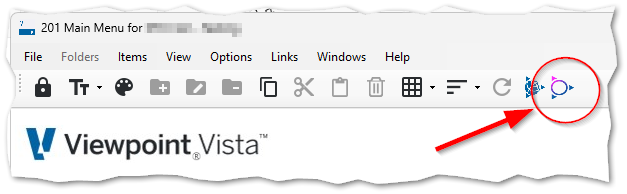
You can access help without ever leaving the Vista interface. On your main toolbar, you'll find a dedicated icon that launches the Trimble Assistant directly within your active window. No context switching, no lost productivity.
Conversational Intelligence
Once opened, the Assistant acts as your personal technical expert. Instead of using complex search strings, you can simply ask a question in plain language. For example, setting up local tax codes for specific states can often be a multi-step, confusing process.
By asking the Assistant, "how do I set up Pennsylvania State Local Codes," I received a comprehensive, step-by-step guide in just a couple of seconds.

The guidance covers everything from entering the Local Code and Tax ID to specific regional details like the "MATCB" taxing entity code for employees residing in the Middletown jurisdiction.
The Game-Changer:
The efficiency here is a game-changer. I didn't need to spend time searching through help manuals or scrolling through forum posts. The exact procedure I needed appeared instantly, right where I was already working.
Key Benefits of Trimble Assistant:
- Stay in the Flow: Get answers without closing your current data entry screen or switching browsers.
- Precision Guidance: Receive specific field names and code recommendations tailored to your query.
- Direct Links: If you need further reading, the Assistant provides direct links to the relevant Trimble Help documentation.
Next time you're unsure about a setup procedure or a specific field in Vista, look for the Trimble icon in your toolbar. It turns a potential 30-minute search into a 5-second solution.
Unlock Your Full Potential
If you want to unlock the full potential of your data and streamline your operations, we are here to help. Visit our website at www.constructech.io and click the Book-A-Call link to schedule a consultation with our experts today.
In the construction management industry, time is one of our most valuable resources. When you're working within Viewpoint Vista and hit a technical roadblock, the last thing you want to do is navigate away from your work to hunt through dense manuals or external knowledge base articles. Fortunately, Trimble has integrated a faster way to get answers: Trimble Assistant.
The Gateway to Answers
You can access help without ever leaving the Vista interface. On your main toolbar, you'll find a dedicated icon that launches the Trimble Assistant directly within your active window. No context switching, no lost productivity.
Conversational Intelligence
Once opened, the Assistant acts as your personal technical expert. Instead of using complex search strings, you can simply ask a question in plain language. For example, setting up local tax codes for specific states can often be a multi-step, confusing process.
By asking the Assistant, "how do I set up Pennsylvania State Local Codes," I received a comprehensive, step-by-step guide in just a couple of seconds.
The guidance covers everything from entering the Local Code and Tax ID to specific regional details like the "MATCB" taxing entity code for employees residing in the Middletown jurisdiction.
The Game-Changer:
The efficiency here is a game-changer. I didn't need to spend time searching through help manuals or scrolling through forum posts. The exact procedure I needed appeared instantly, right where I was already working.
Key Benefits of Trimble Assistant:
- Stay in the Flow: Get answers without closing your current data entry screen or switching browsers.
- Precision Guidance: Receive specific field names and code recommendations tailored to your query.
- Direct Links: If you need further reading, the Assistant provides direct links to the relevant Trimble Help documentation.
Next time you're unsure about a setup procedure or a specific field in Vista, look for the Trimble icon in your toolbar. It turns a potential 30-minute search into a 5-second solution.
Unlock Your Full Potential
If you want to unlock the full potential of your data and streamline your operations, we are here to help. Visit our website at www.constructech.io and click the Book-A-Call link to schedule a consultation with our experts today.
In the construction management industry, time is one of our most valuable resources. When you're working within Viewpoint Vista and hit a technical roadblock, the last thing you want to do is navigate away from your work to hunt through dense manuals or external knowledge base articles. Fortunately, Trimble has integrated a faster way to get answers: Trimble Assistant.
The Gateway to Answers
You can access help without ever leaving the Vista interface. On your main toolbar, you'll find a dedicated icon that launches the Trimble Assistant directly within your active window. No context switching, no lost productivity.
Conversational Intelligence
Once opened, the Assistant acts as your personal technical expert. Instead of using complex search strings, you can simply ask a question in plain language. For example, setting up local tax codes for specific states can often be a multi-step, confusing process.
By asking the Assistant, "how do I set up Pennsylvania State Local Codes," I received a comprehensive, step-by-step guide in just a couple of seconds.
The guidance covers everything from entering the Local Code and Tax ID to specific regional details like the "MATCB" taxing entity code for employees residing in the Middletown jurisdiction.
The Game-Changer:
The efficiency here is a game-changer. I didn't need to spend time searching through help manuals or scrolling through forum posts. The exact procedure I needed appeared instantly, right where I was already working.
Key Benefits of Trimble Assistant:
- Stay in the Flow: Get answers without closing your current data entry screen or switching browsers.
- Precision Guidance: Receive specific field names and code recommendations tailored to your query.
- Direct Links: If you need further reading, the Assistant provides direct links to the relevant Trimble Help documentation.
Next time you're unsure about a setup procedure or a specific field in Vista, look for the Trimble icon in your toolbar. It turns a potential 30-minute search into a 5-second solution.
Unlock Your Full Potential
If you want to unlock the full potential of your data and streamline your operations, we are here to help. Visit our website at www.constructech.io and click the Book-A-Call link to schedule a consultation with our experts today.


Get Started
Take your construction company to the next level. Schedule your initial free consultation and analysis.