
ProjectSight's New Addition: Charlie & Conversational Daily Reports
Using ProjectSight AI chatbot to quickly and efficiently log labor and equipment data.
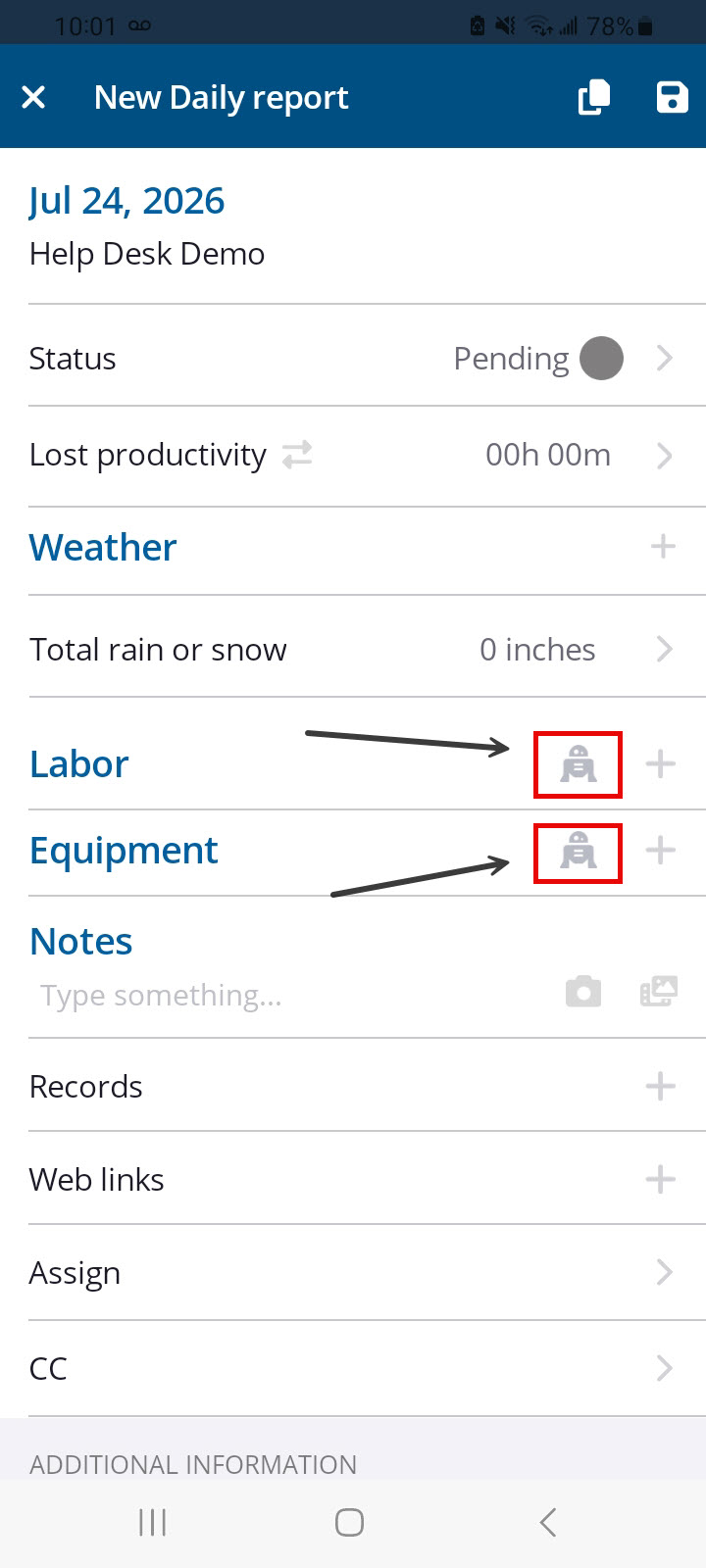

ProjectSight’s AI assistant, Charlie, was added last year to assist users in answering quick and specific questions about the software. Today, that same AI chatbot can help users seamlessly build Daily Reports from their phones. In this blog post today, we will dive deeper into how Charlie functions within daily reports and how your field teams can leverage their full feature set on job sites.
To begin using Charlie, you can open the chatbot directly from the Daily Reports module on your ProjectSight Mobile app. This feature is only available to users who have received a license from their primary admin, though you will need an active internet connection and your project's Labor settings cannot be configured to "Detailed."
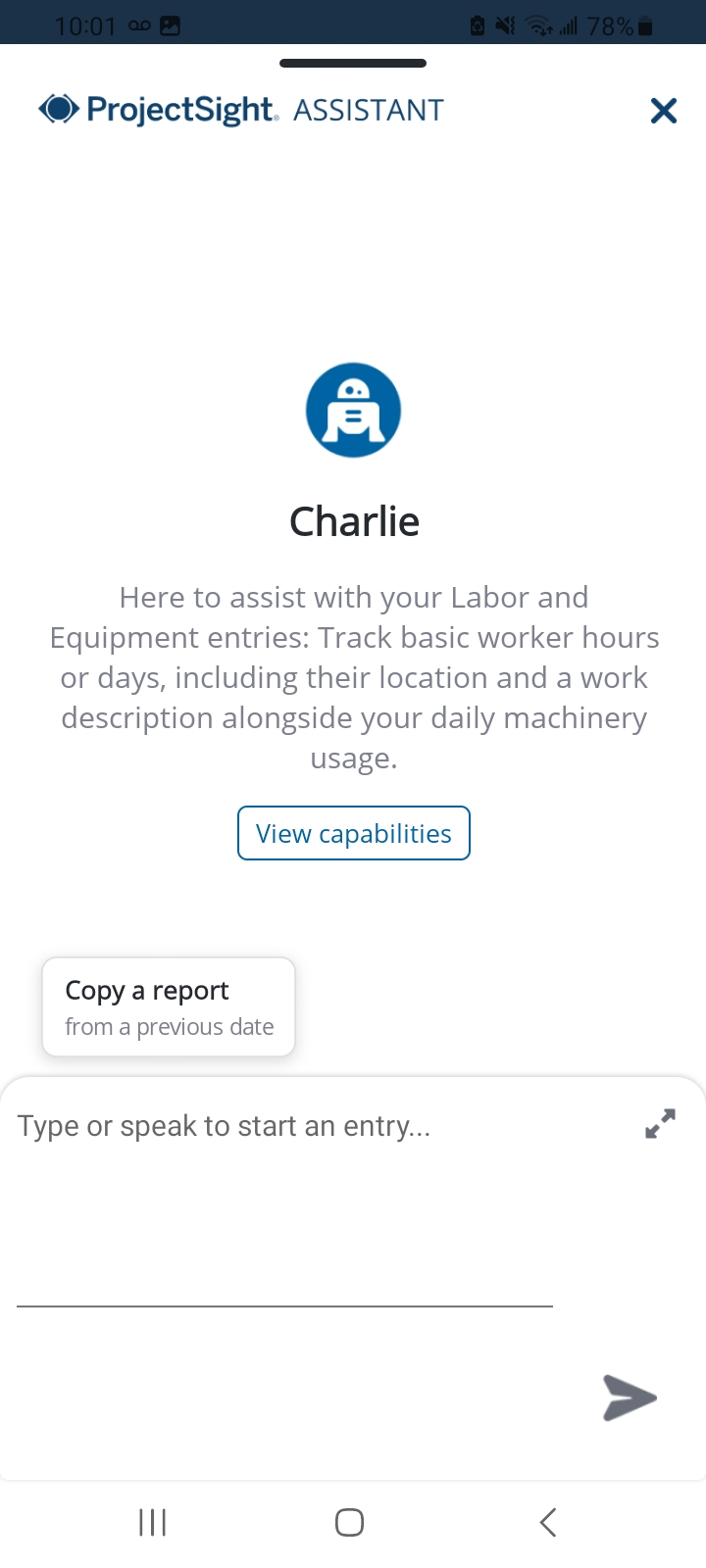
Once you launch Charlie, you will see a main home page featuring an expandable text box for typing details, a quick-selection menu to view Charlie's capabilities, a shortcut to copy entries from prior reports, and a microphone icon. Selecting the microphone activates voice dictation, allowing field staff to simply speak their labor and equipment details rather than typing them out manually on a phone.
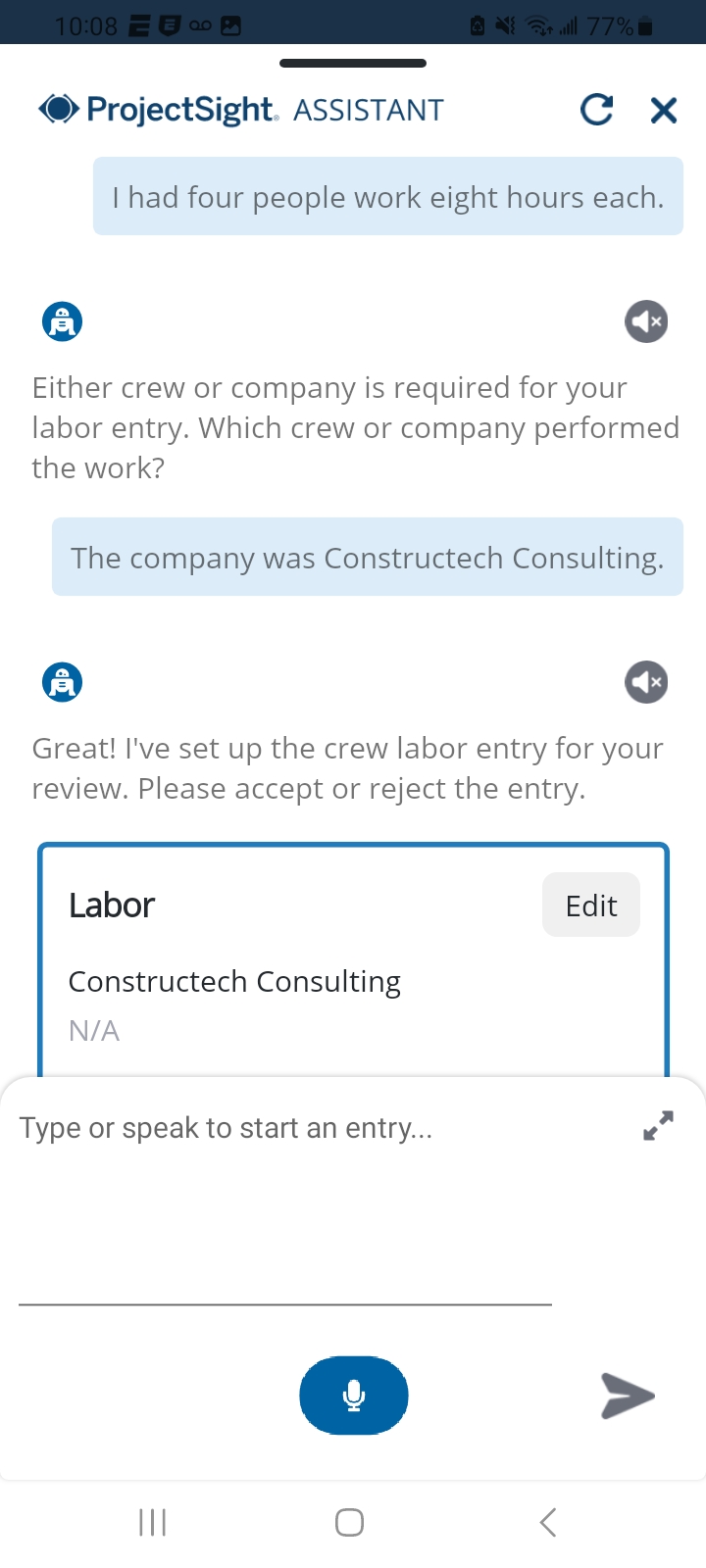
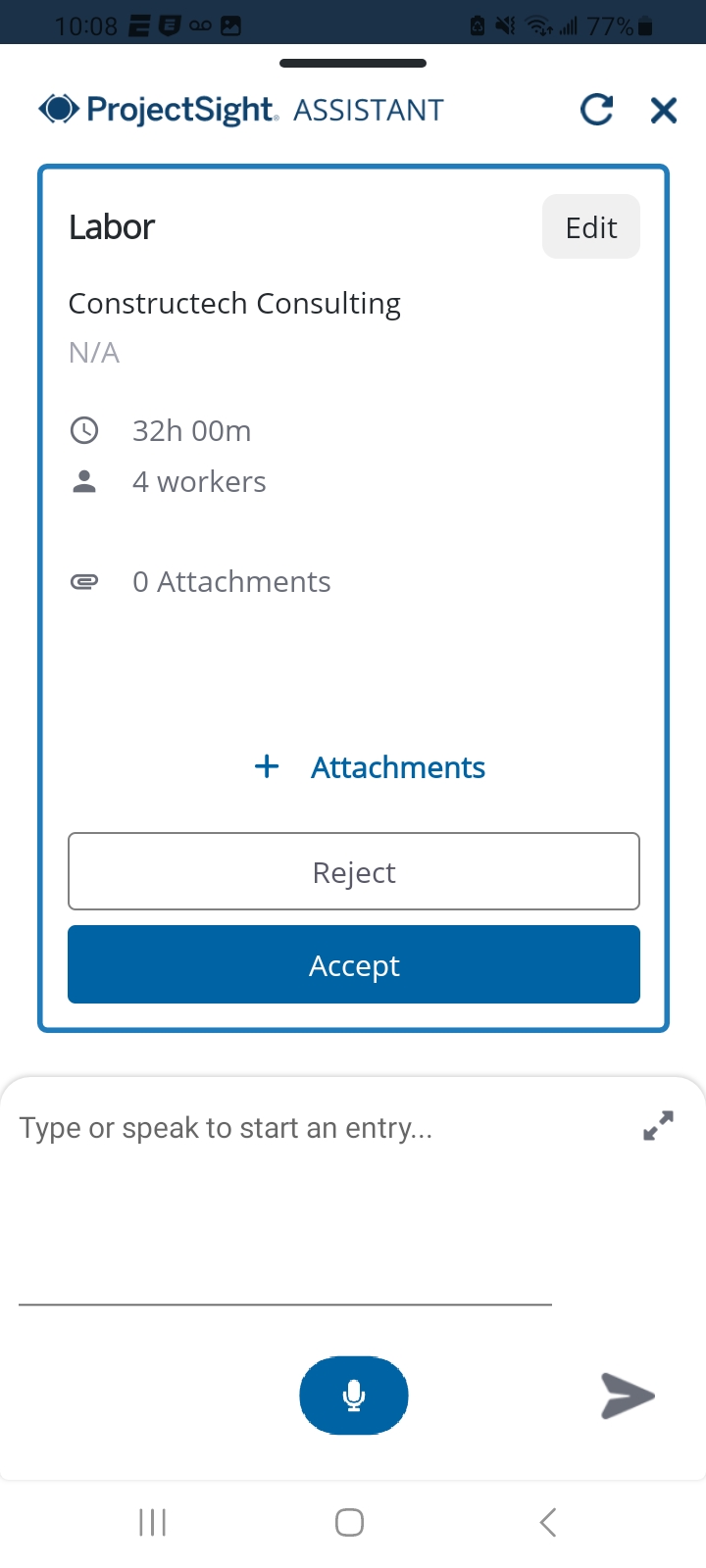
When creating labor cards through Charlie, the chatbot takes your conversational input and generates proposed entries for your review. From the Labor card section, you can add attachments, such as photos or site documents, to a proposed card before approving it, ensuring complete documentation right from the start. You can also use the "Approve all labor cards" option to quickly finalize pending entries in bulk. Throughout this process, the interface gives you real-time visibility into total approved hours, total pending hours, and total workers assigned to the report.
Managing equipment is just as streamlined whether you access Charlie from an individual Equipment card or the full Equipment log. Charlie allows you to record company names, hours used, hourly rates, and specific operational notes for each piece of equipment. The Equipment log view tracks summary metrics automatically, giving you immediate totals for both equipment quantity and cumulative hours logged across the job site. If your crews perform similar work day after day, you can also use the copy feature on Charlie's home page or within the card headers to carry over labor and equipment data from a previous report, saving significant time on repetitive data entry.
Charlie is one of ProjectSight Mobile’s most effective tools for reducing friction in field documentation and getting accurate site data logged quickly. If you have any questions about how to leverage Charlie for your daily reporting workflows, please visit our website – ConstrucTech Consulting – and Book a Call with one of our consultants.
ProjectSight’s AI assistant, Charlie, was added last year to assist users in answering quick and specific questions about the software. Today, that same AI chatbot can help users seamlessly build Daily Reports from their phones. In this blog post today, we will dive deeper into how Charlie functions within daily reports and how your field teams can leverage their full feature set on job sites.
To begin using Charlie, you can open the chatbot directly from the Daily Reports module on your ProjectSight Mobile app. This feature is only available to users who have received a license from their primary admin, though you will need an active internet connection and your project's Labor settings cannot be configured to "Detailed."
Once you launch Charlie, you will see a main home page featuring an expandable text box for typing details, a quick-selection menu to view Charlie's capabilities, a shortcut to copy entries from prior reports, and a microphone icon. Selecting the microphone activates voice dictation, allowing field staff to simply speak their labor and equipment details rather than typing them out manually on a phone.
When creating labor cards through Charlie, the chatbot takes your conversational input and generates proposed entries for your review. From the Labor card section, you can add attachments, such as photos or site documents, to a proposed card before approving it, ensuring complete documentation right from the start. You can also use the "Approve all labor cards" option to quickly finalize pending entries in bulk. Throughout this process, the interface gives you real-time visibility into total approved hours, total pending hours, and total workers assigned to the report.
Managing equipment is just as streamlined whether you access Charlie from an individual Equipment card or the full Equipment log. Charlie allows you to record company names, hours used, hourly rates, and specific operational notes for each piece of equipment. The Equipment log view tracks summary metrics automatically, giving you immediate totals for both equipment quantity and cumulative hours logged across the job site. If your crews perform similar work day after day, you can also use the copy feature on Charlie's home page or within the card headers to carry over labor and equipment data from a previous report, saving significant time on repetitive data entry.
Charlie is one of ProjectSight Mobile’s most effective tools for reducing friction in field documentation and getting accurate site data logged quickly. If you have any questions about how to leverage Charlie for your daily reporting workflows, please visit our website – ConstrucTech Consulting – and Book a Call with one of our consultants.
ProjectSight’s AI assistant, Charlie, was added last year to assist users in answering quick and specific questions about the software. Today, that same AI chatbot can help users seamlessly build Daily Reports from their phones. In this blog post today, we will dive deeper into how Charlie functions within daily reports and how your field teams can leverage their full feature set on job sites.
To begin using Charlie, you can open the chatbot directly from the Daily Reports module on your ProjectSight Mobile app. This feature is only available to users who have received a license from their primary admin, though you will need an active internet connection and your project's Labor settings cannot be configured to "Detailed."
Once you launch Charlie, you will see a main home page featuring an expandable text box for typing details, a quick-selection menu to view Charlie's capabilities, a shortcut to copy entries from prior reports, and a microphone icon. Selecting the microphone activates voice dictation, allowing field staff to simply speak their labor and equipment details rather than typing them out manually on a phone.
When creating labor cards through Charlie, the chatbot takes your conversational input and generates proposed entries for your review. From the Labor card section, you can add attachments, such as photos or site documents, to a proposed card before approving it, ensuring complete documentation right from the start. You can also use the "Approve all labor cards" option to quickly finalize pending entries in bulk. Throughout this process, the interface gives you real-time visibility into total approved hours, total pending hours, and total workers assigned to the report.
Managing equipment is just as streamlined whether you access Charlie from an individual Equipment card or the full Equipment log. Charlie allows you to record company names, hours used, hourly rates, and specific operational notes for each piece of equipment. The Equipment log view tracks summary metrics automatically, giving you immediate totals for both equipment quantity and cumulative hours logged across the job site. If your crews perform similar work day after day, you can also use the copy feature on Charlie's home page or within the card headers to carry over labor and equipment data from a previous report, saving significant time on repetitive data entry.
Charlie is one of ProjectSight Mobile’s most effective tools for reducing friction in field documentation and getting accurate site data logged quickly. If you have any questions about how to leverage Charlie for your daily reporting workflows, please visit our website – ConstrucTech Consulting – and Book a Call with one of our consultants.


Get Started
Take your construction company to the next level. Schedule your initial free consultation and analysis.