
The Future: ProjectSight's 360 Capture Technology
Using ProjectSight's 360 Capture feature to synchronize the job site and the office.
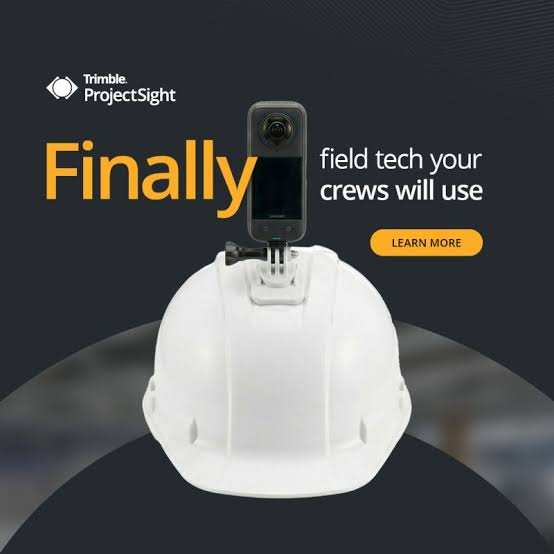

Introduced late last year, ProjectSight's 360 Capture gives project teams a clearer picture – literally – of their job site. Instead of piecemealing photos, videos and notes to figure out how a job site is really doing, 360 Capture uses reality-capture imagery to show you the whole site at once. In this post, we'll break down how 360 Capture works and how your team can start using it in the field.
Getting started is simple
360 Capture works with off-the-shelf 360-degree cameras –specifically the Insta360 X3, X4 and X5 – so there's no specialized equipment to buy or learn. Pair a supported camera with ProjectSight, and you're ready to go with a "one-button" workflow that anyone on the team with proper permission can pick up. And pricing is fixed tier, so there are no data overages or project caps to worry about as you scale it across your organization.
Walk the site and let the software do the rest
To capture a walkthrough, just start recording as you move through the job site. A cloud-based algorithm processes the images in the background, maps your walking path and aligns each image to the corresponding project drawings, and provides a visual map of the site you can compare to original designs or previous dates. Aside-by-side split-screen view makes it easy to line up two points in time and spot exactly what changed. And because privacy matters, faces are automatically blurred during every capture.
Built into the workflows you already use
The primary advantage of 360 Capture is that it does not live in a separate app. If you spot an issue while reviewing a walkthrough, you can embed that capture directly into an RFI or Issue record in ProjectSight. General contractors get full visibility into their job sites and can monitor progress more easily, and subcontractors get indisputable proof of their work.
For project teams overall, 360 Capture means easier progress verification without a site visit, and disputes resolved with real footage instead of guesswork. It's one of ProjectSight's most significant recent additions, built to cut down friction between the office and the field. If you have any questions about getting 360 Capture set up for your projects, please visit our website – ConstrucTech Consulting – and Book a Call with one of our consultants.
Introduced late last year, ProjectSight's 360 Capture gives project teams a clearer picture – literally – of their job site. Instead of piecemealing photos, videos and notes to figure out how a job site is really doing, 360 Capture uses reality-capture imagery to show you the whole site at once. In this post, we'll break down how 360 Capture works and how your team can start using it in the field.
Getting started is simple
360 Capture works with off-the-shelf 360-degree cameras –specifically the Insta360 X3, X4 and X5 – so there's no specialized equipment to buy or learn. Pair a supported camera with ProjectSight, and you're ready to go with a "one-button" workflow that anyone on the team with proper permission can pick up. And pricing is fixed tier, so there are no data overages or project caps to worry about as you scale it across your organization.
Walk the site and let the software do the rest
To capture a walkthrough, just start recording as you move through the job site. A cloud-based algorithm processes the images in the background, maps your walking path and aligns each image to the corresponding project drawings, and provides a visual map of the site you can compare to original designs or previous dates. Aside-by-side split-screen view makes it easy to line up two points in time and spot exactly what changed. And because privacy matters, faces are automatically blurred during every capture.
Built into the workflows you already use
The primary advantage of 360 Capture is that it does not live in a separate app. If you spot an issue while reviewing a walkthrough, you can embed that capture directly into an RFI or Issue record in ProjectSight. General contractors get full visibility into their job sites and can monitor progress more easily, and subcontractors get indisputable proof of their work.
For project teams overall, 360 Capture means easier progress verification without a site visit, and disputes resolved with real footage instead of guesswork. It's one of ProjectSight's most significant recent additions, built to cut down friction between the office and the field. If you have any questions about getting 360 Capture set up for your projects, please visit our website – ConstrucTech Consulting – and Book a Call with one of our consultants.
Introduced late last year, ProjectSight's 360 Capture gives project teams a clearer picture – literally – of their job site. Instead of piecemealing photos, videos and notes to figure out how a job site is really doing, 360 Capture uses reality-capture imagery to show you the whole site at once. In this post, we'll break down how 360 Capture works and how your team can start using it in the field.
Getting started is simple
360 Capture works with off-the-shelf 360-degree cameras –specifically the Insta360 X3, X4 and X5 – so there's no specialized equipment to buy or learn. Pair a supported camera with ProjectSight, and you're ready to go with a "one-button" workflow that anyone on the team with proper permission can pick up. And pricing is fixed tier, so there are no data overages or project caps to worry about as you scale it across your organization.
Walk the site and let the software do the rest
To capture a walkthrough, just start recording as you move through the job site. A cloud-based algorithm processes the images in the background, maps your walking path and aligns each image to the corresponding project drawings, and provides a visual map of the site you can compare to original designs or previous dates. Aside-by-side split-screen view makes it easy to line up two points in time and spot exactly what changed. And because privacy matters, faces are automatically blurred during every capture.
Built into the workflows you already use
The primary advantage of 360 Capture is that it does not live in a separate app. If you spot an issue while reviewing a walkthrough, you can embed that capture directly into an RFI or Issue record in ProjectSight. General contractors get full visibility into their job sites and can monitor progress more easily, and subcontractors get indisputable proof of their work.
For project teams overall, 360 Capture means easier progress verification without a site visit, and disputes resolved with real footage instead of guesswork. It's one of ProjectSight's most significant recent additions, built to cut down friction between the office and the field. If you have any questions about getting 360 Capture set up for your projects, please visit our website – ConstrucTech Consulting – and Book a Call with one of our consultants.


Get Started
Take your construction company to the next level. Schedule your initial free consultation and analysis.