
Union Reciprocity in Trimble Vista: A Practical Guide to Project Specific Overrides
Union Reciprocity in Trimble Vista: A Practical Guide to Project Specific Overrides


Union reciprocity can feel like one of those topics everyone knows is important, but few enjoy untangling. In Trimble Vista, however, the process is far more structured than it appears at first glance. When you understand how PR Craft Templates, job level overrides, and Partial vs. Override reciprocity, you gain precise control over how wages, deductions, and liabilities flow through your payroll.
Union Reciprocity: How to Handle Project Specific Overrides
Union reciprocity is a part of payroll compliance for contractors who work across multiple union jurisdictions. When employees from one local union perform work in another union’s territory, reciprocal agreements determine which craft, rates, deductions, and liabilities apply.
Trimble Vista handles this complexity through PR Craft Templates, allowing you to define, automate, and override payroll rules at the job level—without disrupting your standard employee setup.
Because reciprocity is job specific, Trimble Vista manages it through PR Craft Templates, not through the employee record alone.
Why use PR Craft Templates for Reciprocity?
By starting with a template, you ensure consistency while still allowing job level customization.
Step by Step: Setting Up Union Reciprocity
1. Build the Standard Craft
Start by setting up the employee’s home craft:
• Add standard deductions and liabilities
• Define the default craft structure
This becomes the baseline for all reciprocity logic.
2. Set Up Craft Classes with Standard Rates
Each class within the craft should include:
• Base hourly rate
• Any class specific adjustments
These rates will be used unless a job craft overrides them.
3. Assign Craft and Class to the Employee
On the PR Employee record:
• Select the correct craft and class
• Check the Certified Payroll box if applicable
This ensures the employee defaults to their home union setup.
4. Create a PR Template
This is where reciprocity begins.
1. Create a new PR Template
2. Assign a template number (e.g., 1)
This template will later be tied to the job.
5. Attach Home Craft to the PR Template in PR Craft Template
On the PR Craft Template:
• Select the template number you created
• Enter the job craft (e.g., IBEW48)
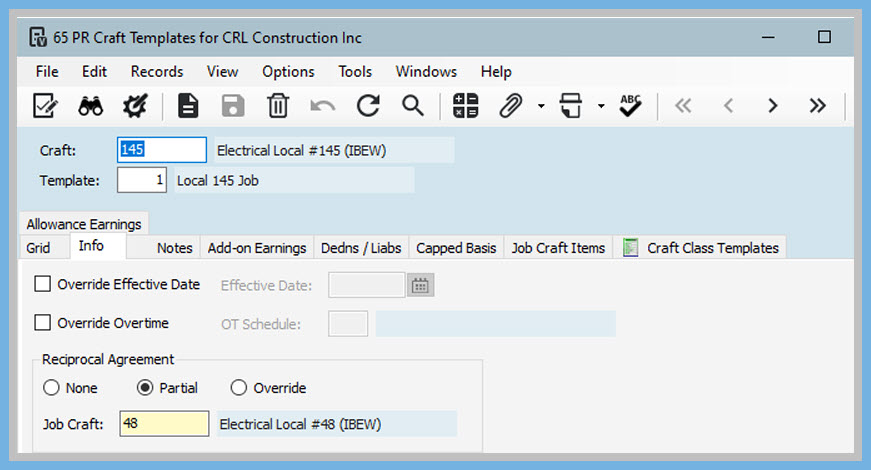
You’ll now choose how the job craft interacts with the employee’s home craft.
Reciprocity Options
• None — Employee’s standard craft always applies
• Partial — Earnings use the employee’s craft, but selected deductions/liabilities follow the job craft
• Override — Job craft fully replaces the employee’s craft for earnings and reporting
This choice determines how Vista calculates and accumulates payroll data.
6. Assign the Template to the Job
Once the template is ready:
• Open the Job
• PR Info Tab, Enter the PR Template
This activates reciprocity for all timecards coded to that job
If you selected Partial, you’ll see a Job Craft Items tab.
• The pay rate comes from the employees’ craft and class
• If the job craft has different deduction/liability rates, override them under the Dedns/Liab tab
When to Use Override Reciprocity
Choose Override when:
• The job craft’s wage package must be used
• All deductions and liabilities must follow the job craft
• The employee is effectively working under the job union’s full jurisdiction
In this mode, the job craft completely replaces the employee’s home craft for payroll purposes.
Union reciprocity in Trimble Vista becomes far more manageable when we use PR Craft Templates to control how earnings, deductions, and liabilities shift between home and job crafts. By clearly defining Partial reciprocity or Override reciprocity, you ensure each project follows the correct union rules without disrupting employee defaults. This structured approach not only reduces payroll errors but also strengthens compliance across multi jurisdictional work.
As always, if you need assistance with any Vista processes, please visit our website ConstrucTech Consulting and Book a Call with one of our consultants.
Union reciprocity can feel like one of those topics everyone knows is important, but few enjoy untangling. In Trimble Vista, however, the process is far more structured than it appears at first glance. When you understand how PR Craft Templates, job level overrides, and Partial vs. Override reciprocity, you gain precise control over how wages, deductions, and liabilities flow through your payroll.
Union Reciprocity: How to Handle Project Specific Overrides
Union reciprocity is a part of payroll compliance for contractors who work across multiple union jurisdictions. When employees from one local union perform work in another union’s territory, reciprocal agreements determine which craft, rates, deductions, and liabilities apply.
Trimble Vista handles this complexity through PR Craft Templates, allowing you to define, automate, and override payroll rules at the job level—without disrupting your standard employee setup.
Because reciprocity is job specific, Trimble Vista manages it through PR Craft Templates, not through the employee record alone.
Why use PR Craft Templates for Reciprocity?
By starting with a template, you ensure consistency while still allowing job level customization.
Step by Step: Setting Up Union Reciprocity
1. Build the Standard Craft
Start by setting up the employee’s home craft:
• Add standard deductions and liabilities
• Define the default craft structure
This becomes the baseline for all reciprocity logic.
2. Set Up Craft Classes with Standard Rates
Each class within the craft should include:
• Base hourly rate
• Any class specific adjustments
These rates will be used unless a job craft overrides them.
3. Assign Craft and Class to the Employee
On the PR Employee record:
• Select the correct craft and class
• Check the Certified Payroll box if applicable
This ensures the employee defaults to their home union setup.
4. Create a PR Template
This is where reciprocity begins.
1. Create a new PR Template
2. Assign a template number (e.g., 1)
This template will later be tied to the job.
5. Attach Home Craft to the PR Template in PR Craft Template
On the PR Craft Template:
• Select the template number you created
• Enter the job craft (e.g., IBEW48)
You’ll now choose how the job craft interacts with the employee’s home craft.
Reciprocity Options
• None — Employee’s standard craft always applies
• Partial — Earnings use the employee’s craft, but selected deductions/liabilities follow the job craft
• Override — Job craft fully replaces the employee’s craft for earnings and reporting
This choice determines how Vista calculates and accumulates payroll data.
6. Assign the Template to the Job
Once the template is ready:
• Open the Job
• PR Info Tab, Enter the PR Template
This activates reciprocity for all timecards coded to that job
If you selected Partial, you’ll see a Job Craft Items tab.
• The pay rate comes from the employees’ craft and class
• If the job craft has different deduction/liability rates, override them under the Dedns/Liab tab
When to Use Override Reciprocity
Choose Override when:
• The job craft’s wage package must be used
• All deductions and liabilities must follow the job craft
• The employee is effectively working under the job union’s full jurisdiction
In this mode, the job craft completely replaces the employee’s home craft for payroll purposes.
Union reciprocity in Trimble Vista becomes far more manageable when we use PR Craft Templates to control how earnings, deductions, and liabilities shift between home and job crafts. By clearly defining Partial reciprocity or Override reciprocity, you ensure each project follows the correct union rules without disrupting employee defaults. This structured approach not only reduces payroll errors but also strengthens compliance across multi jurisdictional work.
As always, if you need assistance with any Vista processes, please visit our website ConstrucTech Consulting and Book a Call with one of our consultants.
Union reciprocity can feel like one of those topics everyone knows is important, but few enjoy untangling. In Trimble Vista, however, the process is far more structured than it appears at first glance. When you understand how PR Craft Templates, job level overrides, and Partial vs. Override reciprocity, you gain precise control over how wages, deductions, and liabilities flow through your payroll.
Union Reciprocity: How to Handle Project Specific Overrides
Union reciprocity is a part of payroll compliance for contractors who work across multiple union jurisdictions. When employees from one local union perform work in another union’s territory, reciprocal agreements determine which craft, rates, deductions, and liabilities apply.
Trimble Vista handles this complexity through PR Craft Templates, allowing you to define, automate, and override payroll rules at the job level—without disrupting your standard employee setup.
Because reciprocity is job specific, Trimble Vista manages it through PR Craft Templates, not through the employee record alone.
Why use PR Craft Templates for Reciprocity?
By starting with a template, you ensure consistency while still allowing job level customization.
Step by Step: Setting Up Union Reciprocity
1. Build the Standard Craft
Start by setting up the employee’s home craft:
• Add standard deductions and liabilities
• Define the default craft structure
This becomes the baseline for all reciprocity logic.
2. Set Up Craft Classes with Standard Rates
Each class within the craft should include:
• Base hourly rate
• Any class specific adjustments
These rates will be used unless a job craft overrides them.
3. Assign Craft and Class to the Employee
On the PR Employee record:
• Select the correct craft and class
• Check the Certified Payroll box if applicable
This ensures the employee defaults to their home union setup.
4. Create a PR Template
This is where reciprocity begins.
1. Create a new PR Template
2. Assign a template number (e.g., 1)
This template will later be tied to the job.
5. Attach Home Craft to the PR Template in PR Craft Template
On the PR Craft Template:
• Select the template number you created
• Enter the job craft (e.g., IBEW48)
You’ll now choose how the job craft interacts with the employee’s home craft.
Reciprocity Options
• None — Employee’s standard craft always applies
• Partial — Earnings use the employee’s craft, but selected deductions/liabilities follow the job craft
• Override — Job craft fully replaces the employee’s craft for earnings and reporting
This choice determines how Vista calculates and accumulates payroll data.
6. Assign the Template to the Job
Once the template is ready:
• Open the Job
• PR Info Tab, Enter the PR Template
This activates reciprocity for all timecards coded to that job
If you selected Partial, you’ll see a Job Craft Items tab.
• The pay rate comes from the employees’ craft and class
• If the job craft has different deduction/liability rates, override them under the Dedns/Liab tab
When to Use Override Reciprocity
Choose Override when:
• The job craft’s wage package must be used
• All deductions and liabilities must follow the job craft
• The employee is effectively working under the job union’s full jurisdiction
In this mode, the job craft completely replaces the employee’s home craft for payroll purposes.
Union reciprocity in Trimble Vista becomes far more manageable when we use PR Craft Templates to control how earnings, deductions, and liabilities shift between home and job crafts. By clearly defining Partial reciprocity or Override reciprocity, you ensure each project follows the correct union rules without disrupting employee defaults. This structured approach not only reduces payroll errors but also strengthens compliance across multi jurisdictional work.
As always, if you need assistance with any Vista processes, please visit our website ConstrucTech Consulting and Book a Call with one of our consultants.


Get Started
Take your construction company to the next level. Schedule your initial free consultation and analysis.