
Tip Tuesday
What's New in Vista Update 2026.3


What’s New in Vista 2026.3
The Vista 2026.3 release brings a fresh set of enhancements designed to improve usability, strengthen compliance, and streamline everyday workflows. Along with important defect fixes across all geographies, this update focuses heavily on user-requested improvements across key areas like Payroll, HR, and system administration.
Let’s take a closer look at what’s new.
General Enhancements
Easier Access to Trimble Assistant
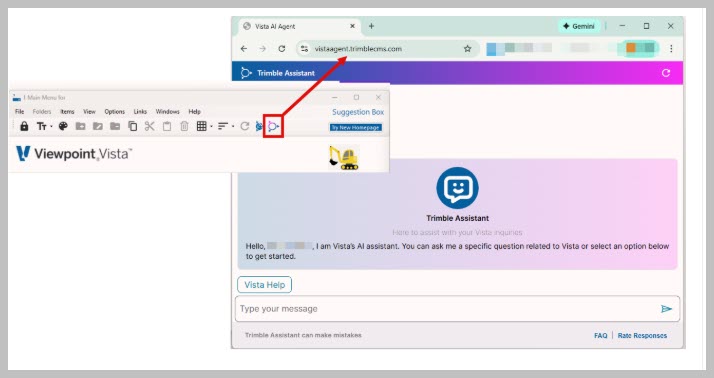
Users logging in with Trimble ID can now access the Trimble Assistant directly from a new icon on the Vista main menu. With just one click, the Assistant launches in your default web browser, giving you immediate, on-demand support.
The Trimble Assistant acts as a built-in chat resource, helping you quickly find answers to questions about Vista tasks using information sourced directly from Vista Help. It’s a faster, more intuitive way to get the guidance you need—right when you need it.
Human Resources Updates
New “Work Email” Field
A new Work Email field is now available on the Info tab in the HR Resources form. This allows organizations to clearly separate professional and personal email communications for employees.
This small but impactful addition helps improve communication clarity and supports better data organization within HR records.
Payroll Enhancements
Work Email Field Added to PR Employees
In alignment with HR updates, the PR Employees form now also includes a Work Email field on the Info tab. This ensures consistency across employee records and supports more structured communication practices.
Smart Payroll: Automated Overtime Validation
A new Overtime Validation rule has been added to the PR Timecard Validation Rules form. This feature automatically evaluates timecards to determine the most beneficial overtime rule for each employee.
It flags potential overpayments or underpayments before payroll is processed, helping reduce errors and ensuring employees are paid accurately.
Smart Payroll: Meal Break Compliance
Another powerful addition is the Meal Break Compliance rule, which validates timecards for hourly, non-exempt employees against state-mandated meal break requirements.
By identifying missing or insufficient breaks ahead of payroll processing, this feature helps organizations stay compliant with labor laws and avoid costly mistakes.
Viewpoint Administration Updates
API Published Checkbox Now Visible
The Published checkbox is now visible in the VA Inquiries form. This indicator shows whether an inquiry has been made available to an API, such as AppXChange.
While most users won’t need to interact with this field, it’s important to exercise caution: modifying inquiries marked as published could disrupt existing API integrations.
Expanded Access for PM License Type Users
Vista 2026.3 expands access to several forms and reports for users assigned the PM License Type. This enhancement allows more flexibility while maintaining license-based control over who can run specific programs.
Newly available forms include:
- JC Std Item Codes (JCSI)
- PO Compliance (POComplyHeader)
- SL Compliance (SLComplyHeader)
Newly available reports include:
- JC Progress Posting (#535)
- JC Projections (#544)
- JC Revenue Projections (#548)
- PO Change Order (#718)
- PO Entry (#727)
- SL Change Order (#883)
- SL Entry (#891)
It’s important to note that license types don’t directly grant or restrict access—they help define which users are eligible to run certain forms and reports.
Stay Informed on Fixes
To review a full list of defects resolved in this release, visit the Track Cases/Issues page in the Viewpoint Customer Portal. Apply filters for your product and module, then select Vista 2026.3 in the “Fixed in Version” field. You can get to the Track Cases/Issues page by clicking here. Note: you must be signed into the Viewpoint Customer Portal.
Final Thoughts
Vista 2026.3 delivers meaningful improvements that enhance efficiency, accuracy, and compliance—especially in Payroll and HR processes. With smarter validation tools and improved accessibility, this release helps teams work more confidently and effectively every day. As always, you can visit our ContrucTech Consulting website to get more information about our services, to "Book A Call" with a team member, to view a list of companies we partner with, or to view additonal Tip Tuesday blogs.
What’s New in Vista 2026.3
The Vista 2026.3 release brings a fresh set of enhancements designed to improve usability, strengthen compliance, and streamline everyday workflows. Along with important defect fixes across all geographies, this update focuses heavily on user-requested improvements across key areas like Payroll, HR, and system administration.
Let’s take a closer look at what’s new.
General Enhancements
Easier Access to Trimble Assistant
Users logging in with Trimble ID can now access the Trimble Assistant directly from a new icon on the Vista main menu. With just one click, the Assistant launches in your default web browser, giving you immediate, on-demand support.
The Trimble Assistant acts as a built-in chat resource, helping you quickly find answers to questions about Vista tasks using information sourced directly from Vista Help. It’s a faster, more intuitive way to get the guidance you need—right when you need it.
Human Resources Updates
New “Work Email” Field
A new Work Email field is now available on the Info tab in the HR Resources form. This allows organizations to clearly separate professional and personal email communications for employees.
This small but impactful addition helps improve communication clarity and supports better data organization within HR records.
Payroll Enhancements
Work Email Field Added to PR Employees
In alignment with HR updates, the PR Employees form now also includes a Work Email field on the Info tab. This ensures consistency across employee records and supports more structured communication practices.
Smart Payroll: Automated Overtime Validation
A new Overtime Validation rule has been added to the PR Timecard Validation Rules form. This feature automatically evaluates timecards to determine the most beneficial overtime rule for each employee.
It flags potential overpayments or underpayments before payroll is processed, helping reduce errors and ensuring employees are paid accurately.
Smart Payroll: Meal Break Compliance
Another powerful addition is the Meal Break Compliance rule, which validates timecards for hourly, non-exempt employees against state-mandated meal break requirements.
By identifying missing or insufficient breaks ahead of payroll processing, this feature helps organizations stay compliant with labor laws and avoid costly mistakes.
Viewpoint Administration Updates
API Published Checkbox Now Visible
The Published checkbox is now visible in the VA Inquiries form. This indicator shows whether an inquiry has been made available to an API, such as AppXChange.
While most users won’t need to interact with this field, it’s important to exercise caution: modifying inquiries marked as published could disrupt existing API integrations.
Expanded Access for PM License Type Users
Vista 2026.3 expands access to several forms and reports for users assigned the PM License Type. This enhancement allows more flexibility while maintaining license-based control over who can run specific programs.
Newly available forms include:
- JC Std Item Codes (JCSI)
- PO Compliance (POComplyHeader)
- SL Compliance (SLComplyHeader)
Newly available reports include:
- JC Progress Posting (#535)
- JC Projections (#544)
- JC Revenue Projections (#548)
- PO Change Order (#718)
- PO Entry (#727)
- SL Change Order (#883)
- SL Entry (#891)
It’s important to note that license types don’t directly grant or restrict access—they help define which users are eligible to run certain forms and reports.
Stay Informed on Fixes
To review a full list of defects resolved in this release, visit the Track Cases/Issues page in the Viewpoint Customer Portal. Apply filters for your product and module, then select Vista 2026.3 in the “Fixed in Version” field. You can get to the Track Cases/Issues page by clicking here. Note: you must be signed into the Viewpoint Customer Portal.
Final Thoughts
Vista 2026.3 delivers meaningful improvements that enhance efficiency, accuracy, and compliance—especially in Payroll and HR processes. With smarter validation tools and improved accessibility, this release helps teams work more confidently and effectively every day. As always, you can visit our ContrucTech Consulting website to get more information about our services, to "Book A Call" with a team member, to view a list of companies we partner with, or to view additonal Tip Tuesday blogs.
What’s New in Vista 2026.3
The Vista 2026.3 release brings a fresh set of enhancements designed to improve usability, strengthen compliance, and streamline everyday workflows. Along with important defect fixes across all geographies, this update focuses heavily on user-requested improvements across key areas like Payroll, HR, and system administration.
Let’s take a closer look at what’s new.
General Enhancements
Easier Access to Trimble Assistant
Users logging in with Trimble ID can now access the Trimble Assistant directly from a new icon on the Vista main menu. With just one click, the Assistant launches in your default web browser, giving you immediate, on-demand support.
The Trimble Assistant acts as a built-in chat resource, helping you quickly find answers to questions about Vista tasks using information sourced directly from Vista Help. It’s a faster, more intuitive way to get the guidance you need—right when you need it.
Human Resources Updates
New “Work Email” Field
A new Work Email field is now available on the Info tab in the HR Resources form. This allows organizations to clearly separate professional and personal email communications for employees.
This small but impactful addition helps improve communication clarity and supports better data organization within HR records.
Payroll Enhancements
Work Email Field Added to PR Employees
In alignment with HR updates, the PR Employees form now also includes a Work Email field on the Info tab. This ensures consistency across employee records and supports more structured communication practices.
Smart Payroll: Automated Overtime Validation
A new Overtime Validation rule has been added to the PR Timecard Validation Rules form. This feature automatically evaluates timecards to determine the most beneficial overtime rule for each employee.
It flags potential overpayments or underpayments before payroll is processed, helping reduce errors and ensuring employees are paid accurately.
Smart Payroll: Meal Break Compliance
Another powerful addition is the Meal Break Compliance rule, which validates timecards for hourly, non-exempt employees against state-mandated meal break requirements.
By identifying missing or insufficient breaks ahead of payroll processing, this feature helps organizations stay compliant with labor laws and avoid costly mistakes.
Viewpoint Administration Updates
API Published Checkbox Now Visible
The Published checkbox is now visible in the VA Inquiries form. This indicator shows whether an inquiry has been made available to an API, such as AppXChange.
While most users won’t need to interact with this field, it’s important to exercise caution: modifying inquiries marked as published could disrupt existing API integrations.
Expanded Access for PM License Type Users
Vista 2026.3 expands access to several forms and reports for users assigned the PM License Type. This enhancement allows more flexibility while maintaining license-based control over who can run specific programs.
Newly available forms include:
- JC Std Item Codes (JCSI)
- PO Compliance (POComplyHeader)
- SL Compliance (SLComplyHeader)
Newly available reports include:
- JC Progress Posting (#535)
- JC Projections (#544)
- JC Revenue Projections (#548)
- PO Change Order (#718)
- PO Entry (#727)
- SL Change Order (#883)
- SL Entry (#891)
It’s important to note that license types don’t directly grant or restrict access—they help define which users are eligible to run certain forms and reports.
Stay Informed on Fixes
To review a full list of defects resolved in this release, visit the Track Cases/Issues page in the Viewpoint Customer Portal. Apply filters for your product and module, then select Vista 2026.3 in the “Fixed in Version” field. You can get to the Track Cases/Issues page by clicking here. Note: you must be signed into the Viewpoint Customer Portal.
Final Thoughts
Vista 2026.3 delivers meaningful improvements that enhance efficiency, accuracy, and compliance—especially in Payroll and HR processes. With smarter validation tools and improved accessibility, this release helps teams work more confidently and effectively every day. As always, you can visit our ContrucTech Consulting website to get more information about our services, to "Book A Call" with a team member, to view a list of companies we partner with, or to view additonal Tip Tuesday blogs.


Get Started
Take your construction company to the next level. Schedule your initial free consultation and analysis.